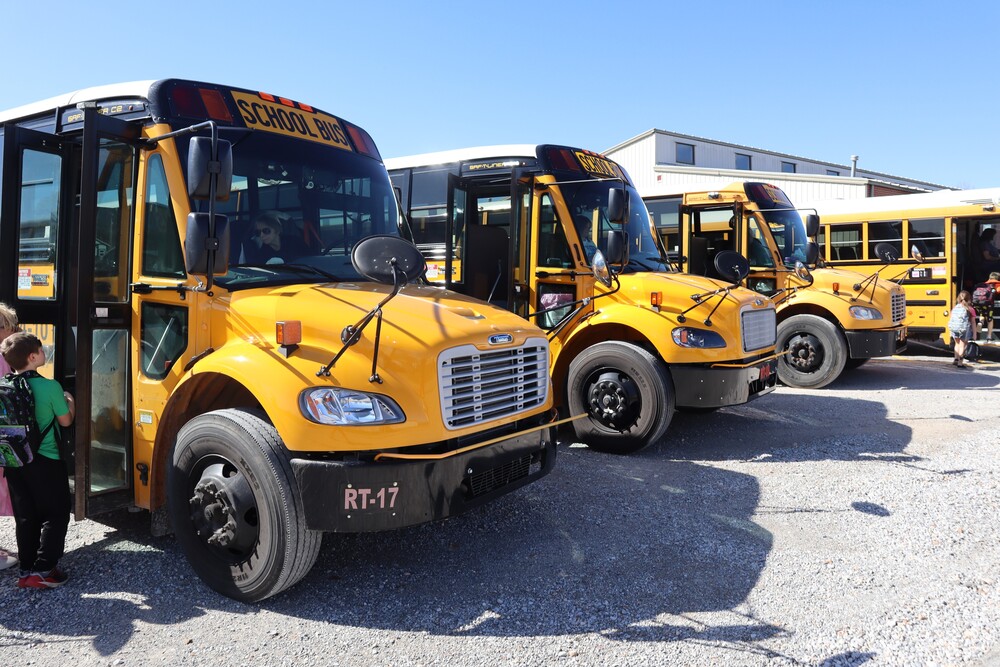
Gravette School District's Transportation Department has made several updates for the upcoming school year to continue improving services for students and families.
One of the key updates is a new starting wage for bus drivers. The school board approved a $3 per hour raise for bus drivers, setting the new starting wage at $23.66 per hour. This places Gravette second regionally in bus driver pay.
Gravette Schools is hiring bus drivers!
The updated employment package includes:
A new starting wage of $23.66 per hour
Paid training
Health and retirement benefits
A flexible schedule
More Hours Available Upon Request
Visit https://www.gravetteschools.net/drive to apply now!
This is a great part-time opportunity for anyone who wants to earn a strong starting wage, work a flexible schedule, and give back to the community. To support these updates, routes were reviewed and adjusted for better efficiency without diminishing the steady service our transportation department provides.
Families will also see an update to the student bus tracking app. The official bus tracking platform is now EZ Arrival. The old EZ A to B app will be retired and removed from app stores on June 12, 2026.
Families will need to download the new EZ Arrival app using the links below.
New EZ Arrival App, Same Log-In
Last August, the Gravette School District Transportation Department rolled out a new bus tracking system. This year, the system has received a significant update including a brand-new name and a better user experience.
Moving forward, our official bus tracking platform is now called EZ Arrival. The old EZ A to B app will be retired and removed from app stores on June 12, 2026. The new app will require a separate download (links below). Families can use the new EZ Arrival mobile app to:
Track their student’s bus location in real time.
Receive proactive alerts when the bus is approaching their stop.
Get instant notifications regarding unexpected delays or route adjustments.
To use the system, families need to first enroll in bus transportation, if they haven't already. The first step is to create an account with our official transportation information service Transact. Only one account is needed per household and multiple students can be added to the same account during registration.
Download New EZ Arrival App

'%3e%3cpath%20d='M10.436%206.67302C10.145%206.98102%209.97302%207.45902%209.97302%208.07802V30.194C9.97302%2030.814%2010.145%2031.291%2010.436%2031.599L10.51%2031.671L22.899%2019.282V19.136V18.99L10.51%206.60002L10.436%206.67302Z'%20fill='url(%23paint0_linear)'/%3e%3cpath%20d='M27.028%2023.413L22.899%2019.282V19.136V18.99L27.029%2014.86L27.122%2014.913L32.015%2017.693C33.412%2018.487%2033.412%2019.786%2032.015%2020.581L27.122%2023.361L27.028%2023.413Z'%20fill='url(%23paint1_linear)'/%3e%3cg%20filter='url(%23filter1_i)'%3e%3cpath%20d='M27.122%2023.36L22.898%2019.136L10.436%2031.599C10.896%2032.087%2011.657%2032.147%2012.514%2031.661L27.122%2023.36Z'%20fill='url(%23paint2_linear)'/%3e%3c/g%3e%3cpath%20d='M27.122%2014.912L12.514%206.61202C11.657%206.12502%2010.896%206.18602%2010.436%206.67402L22.899%2019.137L27.122%2014.912Z'%20fill='url(%23paint3_linear)'/%3e%3c/g%3e%3cdefs%3e%3cfilter%20id='filter0_ii'%20x='9.97302'%20y='6.27594'%20width='23.0898'%20height='25.7208'%20filterUnits='userSpaceOnUse'%20color-interpolation-filters='sRGB'%3e%3cfeFlood%20flood-opacity='0'%20result='BackgroundImageFix'/%3e%3cfeBlend%20mode='normal'%20in='SourceGraphic'%20in2='BackgroundImageFix'%20result='shape'/%3e%3cfeColorMatrix%20in='SourceAlpha'%20type='matrix'%20values='0%200%200%200%200%200%200%200%200%200%200%200%200%200%200%200%200%200%20127%200'%20result='hardAlpha'/%3e%3cfeOffset%20dy='-0.15'/%3e%3cfeComposite%20in2='hardAlpha'%20operator='arithmetic'%20k2='-1'%20k3='1'/%3e%3cfeColorMatrix%20type='matrix'%20values='0%200%200%200%200%200%200%200%200%200%200%200%200%200%200%200%200%200%200.12%200'/%3e%3cfeBlend%20mode='normal'%20in2='shape'%20result='effect1_innerShadow'/%3e%3cfeColorMatrix%20in='SourceAlpha'%20type='matrix'%20values='0%200%200%200%200%200%200%200%200%200%200%200%200%200%200%200%200%200%20127%200'%20result='hardAlpha'/%3e%3cfeOffset%20dy='0.15'/%3e%3cfeComposite%20in2='hardAlpha'%20operator='arithmetic'%20k2='-1'%20k3='1'/%3e%3cfeColorMatrix%20type='matrix'%20values='0%200%200%200%201%200%200%200%200%201%200%200%200%200%201%200%200%200%200.25%200'/%3e%3cfeBlend%20mode='normal'%20in2='effect1_innerShadow'%20result='effect2_innerShadow'/%3e%3c/filter%3e%3cfilter%20id='filter1_i'%20x='10.436'%20y='19.136'%20width='16.686'%20height='12.8607'%20filterUnits='userSpaceOnUse'%20color-interpolation-filters='sRGB'%3e%3cfeFlood%20flood-opacity='0'%20result='BackgroundImageFix'/%3e%3cfeBlend%20mode='normal'%20in='SourceGraphic'%20in2='BackgroundImageFix'%20result='shape'/%3e%3cfeColorMatrix%20in='SourceAlpha'%20type='matrix'%20values='0%200%200%200%200%200%200%200%200%200%200%200%200%200%200%200%200%200%20127%200'%20result='hardAlpha'/%3e%3cfeOffset%20dy='-0.15'/%3e%3cfeComposite%20in2='hardAlpha'%20operator='arithmetic'%20k2='-1'%20k3='1'/%3e%3cfeColorMatrix%20type='matrix'%20values='0%200%200%200%200%200%200%200%200%200%200%200%200%200%200%200%200%200%200.08%200'/%3e%3cfeBlend%20mode='normal'%20in2='shape'%20result='effect1_innerShadow'/%3e%3c/filter%3e%3clinearGradient%20id='paint0_linear'%20x1='21.8008'%20y1='7.84402'%20x2='5.01882'%20y2='24.626'%20gradientUnits='userSpaceOnUse'%3e%3cstop%20stop-color='%2300A0FF'/%3e%3cstop%20offset='0.0066'%20stop-color='%2300A1FF'/%3e%3cstop%20offset='0.2601'%20stop-color='%2300BEFF'/%3e%3cstop%20offset='0.5122'%20stop-color='%2300D2FF'/%3e%3cstop%20offset='0.7604'%20stop-color='%2300DFFF'/%3e%3cstop%20offset='1'%20stop-color='%2300E3FF'/%3e%3c/linearGradient%3e%3clinearGradient%20id='paint1_linear'%20x1='33.8335'%20y1='19.136'%20x2='9.63765'%20y2='19.136'%20gradientUnits='userSpaceOnUse'%3e%3cstop%20stop-color='%23FFE000'/%3e%3cstop%20offset='0.4087'%20stop-color='%23FFBD00'/%3e%3cstop%20offset='0.7754'%20stop-color='%23FFA500'/%3e%3cstop%20offset='1'%20stop-color='%23FF9C00'/%3e%3c/linearGradient%3e%3clinearGradient%20id='paint2_linear'%20x1='24.8281'%20y1='21.4299'%20x2='2.06964'%20y2='44.1884'%20gradientUnits='userSpaceOnUse'%3e%3cstop%20stop-color='%23FF3A44'/%3e%3cstop%20offset='1'%20stop-color='%23C31162'/%3e%3c/linearGradient%3e%3clinearGradient%20id='paint3_linear'%20x1='7.29743'%20y1='-0.688184'%20x2='17.4597'%20y2='9.47412'%20gradientUnits='userSpaceOnUse'%3e%3cstop%20stop-color='%2332A071'/%3e%3cstop%20offset='0.0685'%20stop-color='%232DA771'/%3e%3cstop%20offset='0.4762'%20stop-color='%2315CF74'/%3e%3cstop%20offset='0.8009'%20stop-color='%2306E775'/%3e%3cstop%20offset='1'%20stop-color='%2300F076'/%3e%3c/linearGradient%3e%3c/defs%3e%3c/svg%3e)
App Setup Instructions
New Families & Students | Returning EZ A to B Users |
1. Enroll in Transportation: Before using the app, visit our official online transportation information service, Transact, to create a household account and register your student for bus service. Click here to create a Transact account 2. Download the App: Search for "EZArrival" in the Apple App Store or Google Play Store or use the links above on this page. 3. Create Your Account: Open the app and select the "Sign Up" or "Create Account" option. Follow the on-screen prompts to build your profile and link your student using your freshly approved routing data. | 1. Download the App: Search for "EZArrival" in the Apple App Store or Google Play Store or use the links above on this page. 2. Log In: Open EZ Arrival and log in using your exact same username and password from the old EZ A to B app. Your phone's password manager can autofill these credentials if they were previously saved. Note: If you have forgotten your password from last year, simply tap "Reset Password" on the EZ Arrival login screen and follow the recovery steps via your phone number or email. 3. No Extra Setup Required: You do not need to re-register or re-link your students. All of your routes, student data, and custom settings will automatically carry over once you log in. |