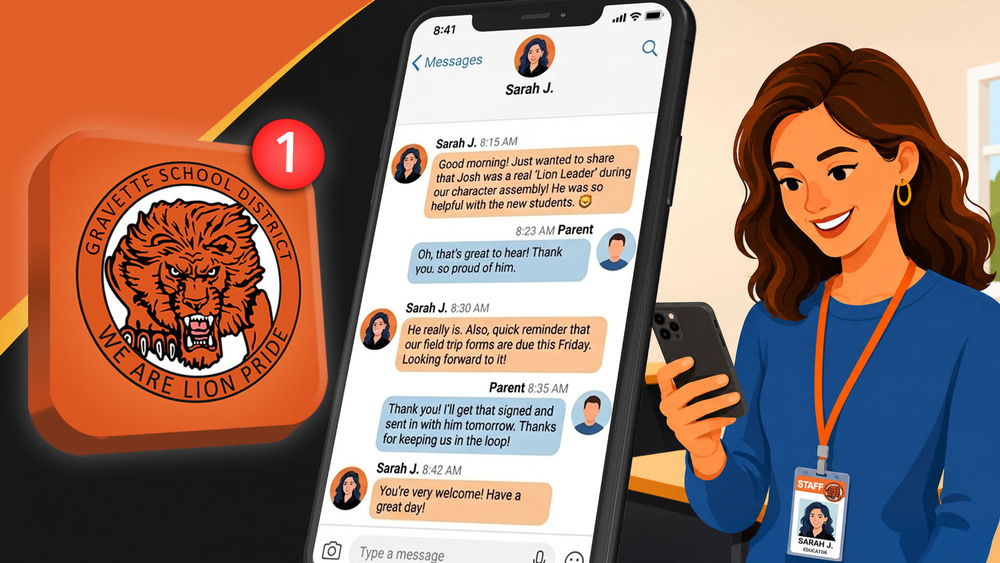
Gravette School District is ready to bring classroom-to-home communications into our official district website and app. In previous years teachers used the mobile app Remind to reach families, but now we will use the Rooms section on our website and app.
There may be a few questions as everyone gets connected. This guide covers some of the most common issues families may encounter, explains how Rooms works with our student records, and points you in the right direction when something isn’t working as expected.
I received a text message from a 5-digit number with a web link and a teacher’s name. Is it legitimate?
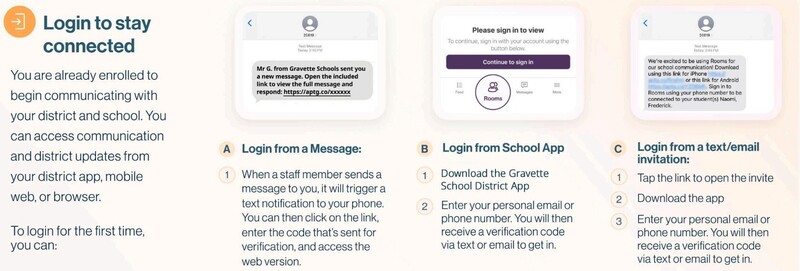
Yes. You may receive a text message containing a link when a staff member first sends you a message through our website and app section Rooms.
On our website and app, a Room is a digital messaging space for a class, club, activity, or other group. It is similar to Google Classroom, which many classes have used in the past. Each Room has a Feed for announcements and a messaging area for direct conversations with your student’s teacher.
You will need to log in before you can access Rooms. Clicking that link allows you to verify your identity and access the message through the web version.
You can then continue using the web version or download the Gravette School District app.
I can't log in. What do I do?
Only students and guardians on our records have accounts to use our website and app for classroom communications, and we can not create new accounts manually.
If you are the guardian listed for your student and you are having trouble logging in, the first step is making sure you're using the same information that's in our student records.
Try logging in using your email address.
Use the email address you provided when registering or updating your student's information.If that doesn't work, try logging in using your phone number.
Use the phone number you provided to the district.Neither one works? Visit your child's school office with your photo ID.
After a quick confirmation that you are the right contact, our staff can help get that sorted.
Ask the office to verify the email address and phone number listed on your student's account. If the information on file is incorrect, your official records can be updated.
After updating your records, your account information on our website/app will be updated by the next morning.
My information on file is correct, but I still never received a text invite. What do I do now?
You may have previously opted out of text messages from the district by replying STOP. There are actually two different numbers used for school communications:
27806 – Rooms/Connect: Teacher and classroom communication
98900 – Alerts: District and school mass notifications
To make sure you're subscribed to both, text START to 27806 and START to 98900. Then try again.
I'm logged in, but I don't see my child's classroom or teacher. Why not?
First, check with your child's teacher to make sure they are using Rooms to update parents. Some teachers may not require parents to stay connected to their individual class.
Rooms account information is connected to student enrollment records. Only the student and guardians associated with that student in our school records can be connected to the student's class Rooms.
If you believe you should be listed as a guardian but aren't seeing your student's Rooms, make sure the records for your student has up-to-date contact info. See the last few answers in this guide for more details.
For student privacy and safety, teachers cannot manually add other family members, friends, or contacts to a student's classroom Room. Only direct, registered guardians have access and they must accept an invitation sent directly from the teacher first.
I changed my phone number or email address. Where do I update it?
Bring a photo ID with you as you visit your child's school office. Once confirming your identity, our staff can update your information on the spot.
The contact information used by the app comes from student enrollment records. Updating information somewhere else on your phone or in the app does not necessarily update the official contact information associated with your student.
Keeping this information current is important because it is also used by the district for reaching you regarding transportation, safety, food services, administration, and more.
I am not listed as the guardian, but I still want to get updates from the school. How can I get access?
You can still use the Gravette School District app or website without an account to receive public updates, view events, and get urgent notifications for community members.
The accounts are only for accessing Rooms, which are updates from specific classes and will not include important school-wide information.
Urgent information will be available to everyone visiting the website or using the app, with or without an account.
Do I have to download the Gravette School District app?
Not at all! The app is convenient, but it isn't required.
You can use a computer or phone web browser to get updates or access your account. The website is mobile-friendly, so it works well from your phone even without downloading the app.
Is this app going to buzz my phone all day?
You control how you receive your non-urgent messages.
In the Gravette School District app:
More → ⚙️ Settings → Notification Preferences
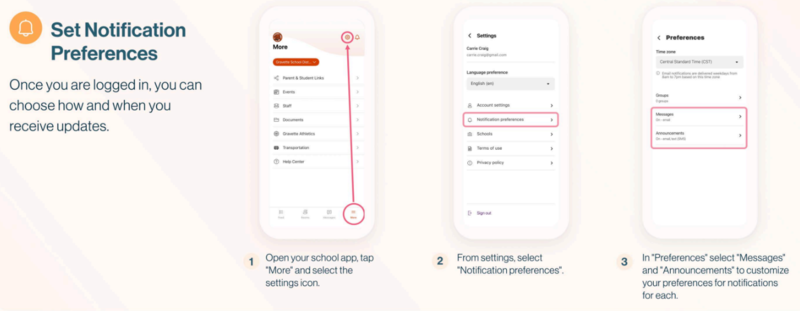
From there, you can customize how you receive Messages and Announcements, including options for immediate notifications or digest-style notifications.
If you have multiple children, taking a minute to set your notification preferences can make the app much more useful without making it overwhelming.
My teacher says they sent a message, but I didn't get a text or notification. Why?
A message sent through Rooms does not necessarily generate an individual text message every time. How you receive Room communication depends on your notification preferences.
Check More → ⚙️ Settings → Notification Preferences in the app to review how you'd like to receive Messages and Announcements.
What if I only need important or urgent school notifications?
Critical district and school notifications are handled separately from your individual class communications. So you can adjust how you receive everyday Room communication without removing yourself from the district's emergency communication system.
I forgot my password for Rooms. What should I do?
Use this link to reset your password.
I have more than one child. Do I need separate accounts?
Only one account is needed per parent. You should use the same email address or phone number associated with you in our school records.
Once connected, your account should provide access to the students and Rooms associated with you as a guardian.
If one child appears but another does not, contact the school so we can determine whether the guardian information associated with the students are different.
I can see one of my child’s classes in Rooms, but not another. Is something wrong?
No two teachers are going to use Rooms in the exact same way. First, verify that the missing Room is one that the teacher is actively using. Teachers will typically reach out if your attention is needed, and they will be able to see who is active and who has not yet received an invitation.
If you are sure that you are not seeing a class Room that you should, contact the school office for the student whose Room is missing and ask the office if your information needs to be updated. Bring a photo ID to the office so they can confirm you are the right person, and your information can be updated to match the information associated with your other student.
Once the records are corrected, the missing student should appear under your existing account after 24 hours.
Can my child use Rooms too?
Where appropriate, students may also be connected to Rooms. What that looks like will vary depending on the student's grade level and how the teacher uses the Room.
In younger grades, most Room communication will naturally be between the teacher and guardians.
Where can I find lunch menus, events, school news, and other information?
That's another reason we encourage families to use the Gravette School District app and website. Rooms are only one part of it.
The district app and website also provides access to school and district news, events, dining information, documents, forms, staff information, and other resources.